Fixing Ctrl+Shift+M Pipes in Positron’s Quarto Visual Mode on Windows
Positron’s Quarto visual mode can intercept familiar R editing shortcuts before they reach the document. The most visible example is Ctrl+Shift+M, which should insert the native pipe operator |> but may do nothing. Editing keybindings.json doesn’t necessarily help because the conflict appears to occur earlier in the input path.
For Windows users, a practical temporary fix is to catch the keystrokes outside Positron and send the intended characters directly to the active document. The workaround uses AutoHotkey v2, with the hotkeys limited to the Positron application so they don’t affect other software.
This is a workaround rather than a permanent Positron configuration. The issue has already been raised in the Quarto and Positron communities, including this Quarto discussion and Positron issues 1955 and 1805. A native fix is likely preferable, but this approach is useful while the shortcut remains unreliable.
Why the usual keybinding approach falls short
Quarto’s ability to combine prose, executable code and rendered output is a major reason to use it inside an IDE. Positron is appealing for the same workflow because it feels responsive and handles both R and Python well. The problem is that Quarto visual mode adds another editor layer, and Positron inherits much of its behavior from VS Code.
When that layer consumes a shortcut, a user-level keybinding may never receive the keystroke. That explains why repeated changes to keybindings.json can produce no result: the setting isn’t necessarily wrong; it may simply be operating at the wrong level.
AutoHotkey changes the point of interception. It watches for the shortcut at the Windows level, checks whether Positron is the active application, and then sends literal text instead of asking Positron to invoke an editor command.
Set up the Windows workaround
1. Install AutoHotkey v2
Download and install version 2 from autohotkey.com. The script below uses AutoHotkey v2 syntax and won’t run under version 1.
2. Create a Positron-specific script
Open AutoHotkey Dash, or the AutoHotkey application available on your system, and choose New Script. Save the blank file somewhere easy to find with a descriptive name such as positron-keys.ahk.
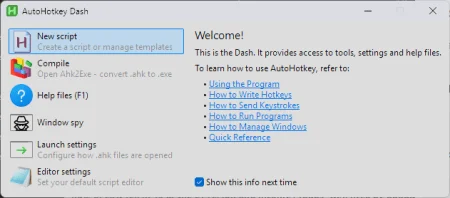
Replace the file’s contents with the following:
#Requires AutoHotkey v2.0
#SingleInstance Force
#HotIf WinActive("ahk_exe Positron.exe")
^+m::SendText(" |> ") ;Ctrl+Shift+M -> native pipe
!-::SendText(" <- ") ;Alt+- -> assignment arrow
#HotIf
The first hotkey maps Ctrl+Shift+M to the native R pipe. The second maps Alt+- to the assignment arrow. Both strings include surrounding spaces, matching the way these operators are commonly inserted in R code.
SendText matters here because it sends the characters literally. Positron doesn’t have to interpret them as a command or resolve another keybinding. The two #HotIf lines restrict the mappings to a window whose executable is Positron.exe, preventing the shortcuts from changing behavior in unrelated applications.
3. Launch the script
Double-click positron-keys.ahk to run it. A green H icon should appear in the Windows system tray, indicating that AutoHotkey is active.
4. Verify the mappings
Open a Quarto document in Positron, switch to visual mode, and press Ctrl+Shift+M. The document should receive |>. Test Alt+- as well if you want the assignment shortcut restored.
If nothing happens, first check that the tray icon is present and that the script is running under AutoHotkey v2. The executable filter also matters: the mapping only applies while the active window is identified as Positron.exe.
5. Start it with Windows
To avoid launching the script manually, press Win+R, enter shell:startup, and press Enter. This opens the current user’s Startup folder.
Right-drag positron-keys.ahk into that folder and choose Create shortcut here. Windows will then launch the script when you sign in, leaving the Positron-specific mappings ready for the next session.
A useful stopgap, not the final answer
This solution is deliberately narrow: it targets Windows, Positron, and two shortcuts. That’s also its strength. It avoids rewriting the editor’s command system and doesn’t alter key behavior across the rest of the desktop.
It remains a piece of desktop automation attached to an IDE workflow, so users on macOS or Linux will need a different mechanism. A native fix in Positron or the Quarto editor integration would be cleaner. Until then, intercepting the keystroke before Positron sees it provides a workable bridge for Windows-based R users.
The workaround was prompted by a suggestion from Claude, with the original script and explanation subsequently edited for practical use. Alternative solutions can be shared through the author’s contact page.
The original post appeared on Giles’ Data Analytics and AI Archives and was contributed to R-bloggers. R-bloggers also provides daily email updates, along with resources on R, learning R, and R and data-science jobs.
Readers can also find the syndicated version through R-bloggers.