Unlocking the Potential of MCP Servers: A New Standard for AI Integration
The Model Context Protocol (MCP) is emerging as a pivotal concept in the landscape of artificial intelligence tooling, particularly for Large Language Models (LLMs). Essentially, an MCP server acts as a bridge, connecting AI models to external data and capabilities that they cannot access independently. This significant shift allows LLMs to execute tasks beyond simple text responses, transforming how they interact with systems like calendars, file systems, and even the internet.
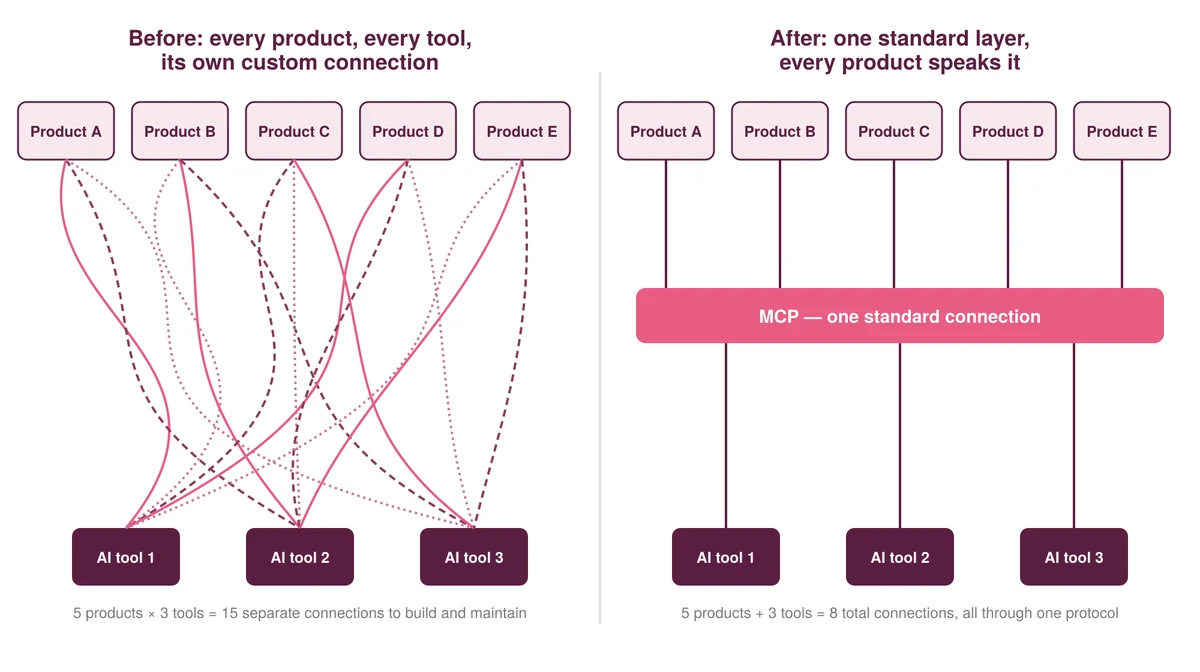
Traditionally, APIs served as the primary mechanism for connecting various software functionalities to AI models. However, they often lead to a complex web of configurations, especially when numerous tools are involved. MCP addresses this issue by providing a standardized connection method. Introduced by Anthropic in late 2024, MCP serves as an open standard similar to a USB port: one connector to rule them all. This approach simplifies the integration process, allowing any model or agent, like Claude or ChatGPT, to communicate effectively with an MCP server irrespective of the underlying software.
Why MCP Serves Better than Traditional APIs
The critical advantage of MCP over traditional API connections is rooted in scalability. As organizations expand their software suites, the unique configurations required for each API become unwieldy. With MCP, the number of connections required diminishes dramatically since a singular protocol can handle various tools. This standardization is vital for developers seeking efficiency and simplicity in connecting multiple software solutions to AI systems.
Creating an MCP Server: A Quick Guide
For those interested in building an MCP server, the process is surprisingly straightforward. With a few lines of code, you can set up an MCP service that allows an AI model to call functions directly. Utilizing MCP documentation, here's a condensed outline to kickstart your project using Python's fastmcp package.
Step 1: Install Necessary Packages
Your first task is to set up the development environment. Utilize the official SDKs for Python, or for this example, the fastmcp package—known for its usability within Posit Connect. Begin by initializing a new project:
mkdir -p ~/projects/
cd ~/projects
uv init --python=3.15 dice-roll
cd dice-roll
uv add fastmcp
Step 2: Define Your Tools
An MCP server works by exposing "tools"—functions that the AI can call. For instance, you could create a function that rolls a die:
# src/dice_roll/__init__.py
from typing import Annotated
import random
from fastmcp import FastMCP
from pydantic import Field

mcp = FastMCP("dice-pick")

@mcp.tool
def roll_dice(
    sides: Annotated[int, Field(description="Number of sides on the die", ge=2)] = 6,
) -> int:
    return random.randint(1, sides)

def main() -> None:
    mcp.run()
The tool description becomes essential for the LLM's understanding. By providing clear metadata through type annotations, the LLM gains context about how to properly use the tool.
Step 3: Connect and Deploy the Server
To test your locally defined MCP server, use the fastmcp framework to register it:
uv run fastmcp install claude-code src/dice_roll/__init__.py:mcp --with-editable .
After registration, when you query Claude about the available tools, it should list your "dice-pick" tool, confirming a successful setup.
Deploying Your MCP Server to Cloud Solutions
While a local server is ideal for testing, scalability often demands deployment in a cloud environment. Posit Connect, utilized for hosting MCP servers, provides a dedicated infrastructure conducive to collaboration. In addition to deploying locally, modifying your server's source code to support HTTP requests allows integration with cloud platforms.
To transition to Posit Connect, create a requirements.txt file that lists dependencies, ensuring a proper environment setup:
uv export --no-dev --no-hashes -o requirements.txt
The actual deployment can be executed using the rsconnect command.
rsconnect deploy fastapi -n--entrypoint dice_roll:app ./
This deployment process allows your MCP server to be accessible remotely, enhancing collaborative use across teams.
Utilizing Your Deployed MCP Server
Implementing a cloud-deployed MCP server mirrors the local setup process. After deployment, configure your AI model to communicate with the cloud server over HTTPS. This can be done with the following command:
claude mcp add --transport httphttps:// /content/ /mcp
This integration allows for quick access and usage of deployed tools, enhancing the functionality of your AI models across various contexts.
Key Takeaways
- MCP servers expand the capabilities of AI models, enabling them to perform tasks beyond their training data.
- The unified MCP protocol simplifies the integration process, making it versatile across different AI models.
- Creating an MCP server requires minimal code, promoting accessibility for developers.
- Deployment to platforms like Posit Connect enhances collaborative functionality and accessibility.
For further details on the topic, you can visit the original post.