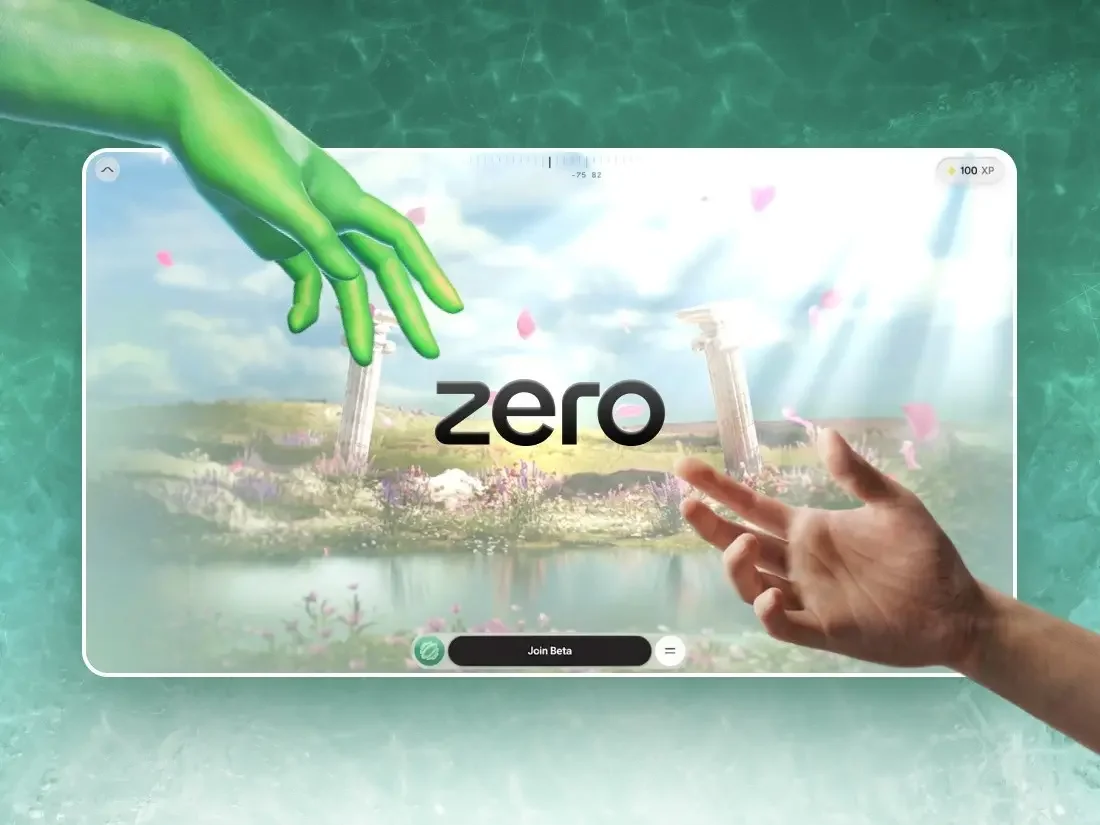
Upon visiting the site, users find themselves confronted with an intriguing challenge: there’s no conventional entry point, just a prompt that urges them to draw a zero. As soon as they complete the gesture, a frost-like effect radiates from the stroke, slowly unveiling the immersive experience—a captivating way to grab a user’s attention and reward their interaction right from the start.
The gesture recognition process is surprisingly straightforward, relying on three criteria: the total signed angle, roundness, and closure of the drawn zero. Only if the gesture meets these standards does it trigger the frost shader:
// accept the stroke as a "zero" only if it truly closes a round loop
const wound    = totalSignedAngle(points, center);   // ~2π for a full turn
const radiusCV = std(radii) / mean(radii);           // low = round, not a scribble
const closed   = dist(points[0], points.at(-1)) < meanRadius;

if (wound > 5.76 && radiusCV < 0.35 && closed) unlock();
This innovative approach leads into a singular, continuous scrolling experience, transitioning from the loading screen into an interactive city map. Remarkably, the entire site, created over the course of four months using libraries such as Three.js, GSAP, Howler, and Vite, manages to condense a source size of over a gigabyte down to under 10MB, maintaining a smooth 60 frames per second, even on basic devices.
How the project began
Instead of conventional pitching, the team opted for a proof of concept that encapsulated their vision from the outset. Atul Khola’s team proposed a bold immersive scrolling narrative that diverged from traditional educational conventions. Within just 48 hours, they developed the zero-drawing interaction and presented a functional prototype—an early win that ultimately secured the project. The utilization of AI facilitated quick initial development, allowing them to focus on refining the project’s nuances and perfecting the frost effect that became central to the experience.
AI’s influence extended beyond just the initial stages. By enabling rapid prototyping, the team could concentrate on testing and refining various effects, experimenting with multiple iterations of effects like the burning money, different shattered glass timings, and shader ideas before finalizing the most effective ones. What emerged wasn’t just code but a meticulously crafted experience where each interaction was polished to ensure it resonated with users.
The narrative journey: six stages, five gates
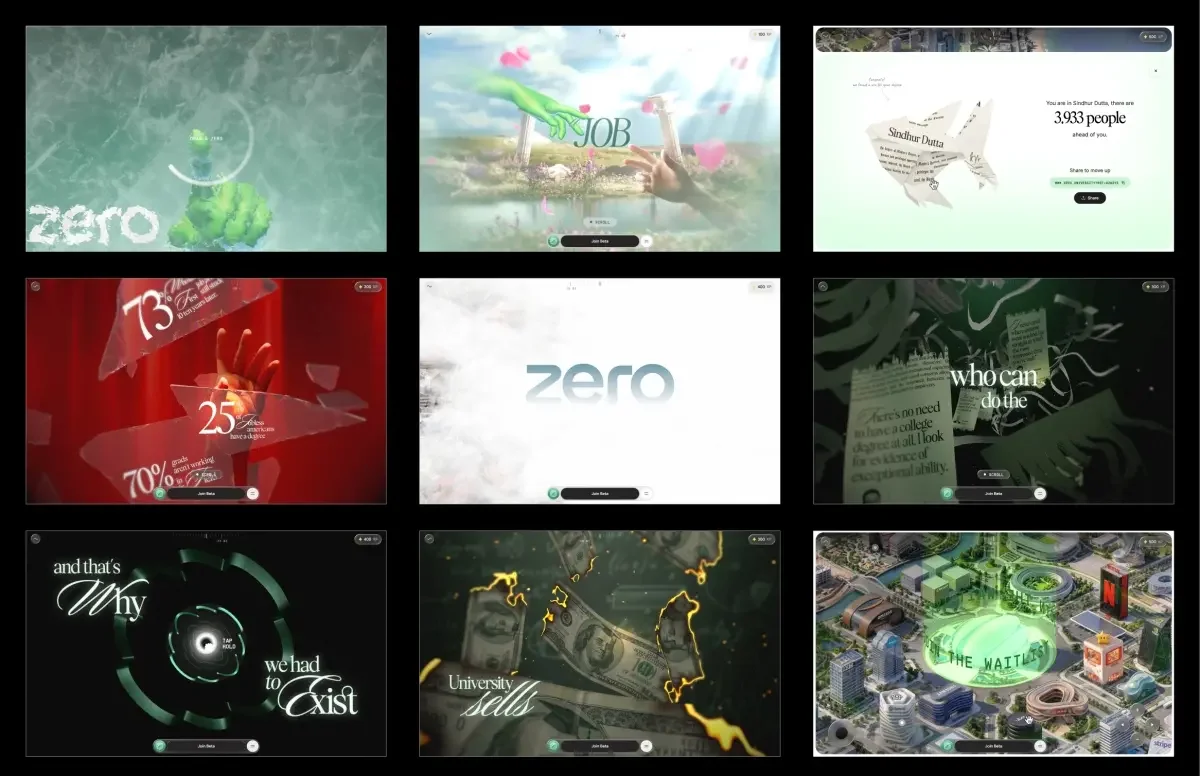
ZERO unfolds through six distinct stages, interconnected by five pivotal interactive gates that either pause or reorient the user’s journey. This includes prompts like drawing a zero and interactions to shatter glass or accelerate through tunnels. The narrative arc begins with the conventional promise of a degree—study, achieve good grades, and secure employment. The first gate shatters this expectation, revealing alarming statistics about unemployment amid shattered glass. Subsequent stages depict the degree as just another piece of paper, illustrating the burning of money and shredding of certificates before transitioning into a tunnel designed in the shape of the ZERO logo, culminating in a vibrant cityscape constructed from real company headquarters. The final stage empowers users to explore an interactive map freely.
The architecture: a single numeral drives all elements
A key architectural choice was to shy away from relying on standard browser scrolling. Instead of utilizing ScrollTrigger or bulky scrolling DOMs, wheel and touch interactions feed into a virtual scroll value that self-adjusts. Every aspect of the experience—from asset loading and animations to shader timings—is synchronized to this single scroll value.
The project is modular, broken down into nine segments, each with its own lifecycle. This design choice made the codebase simpler and debugging more streamlined, allowing developers to revisit any segment as needed without disrupting the entire flow:
{
  scrollVh: 300,            // how much virtual scroll this segment owns
  enter(ctx)        { /* build this segment's Three.js objects (async) */ },
  scrub(ctx, p)     { /* p is LOCAL progress 0..1 within this segment  */ },
  update(ctx, t, dt){ /* runs every frame, scroll or not (idle motion) */ },
  teardown(ctx)     { /* dispose and hand off to the next segment      */ },
}
This organized approach significantly aids maintainability, especially as the project evolves. Practically, it means that jumping between stages can be done without losing the integrity of the user experience, ensuring users feel as if they're progressing naturally through the narrative.
Preparing 3D assets for online environments
A substantial amount of time in the four-month timeline was dedicated to asset preparation. The original files arrived as complex Blender scenes, replete with uncompressed geometry and high-quality textures. The first month was largely consumed by determining the optimal formats for the various assets.
To enhance performance, all geometries were compressed using DRACO, paired with self-hosted decoders. Critical lessons were learned about hosting dependencies—the slowdown experienced with external hosting services reinforced the importance of keeping everything self-contained.
The impact of textures on performance was significant; while PNGs appear small, they occupy substantial GPU memory once fully loaded. The switch to KTX2 with ETC1S compression not only reduced memory usage but also sped up upload times, leading to a marked enhancement in rendering efficiency.
The compression previewer
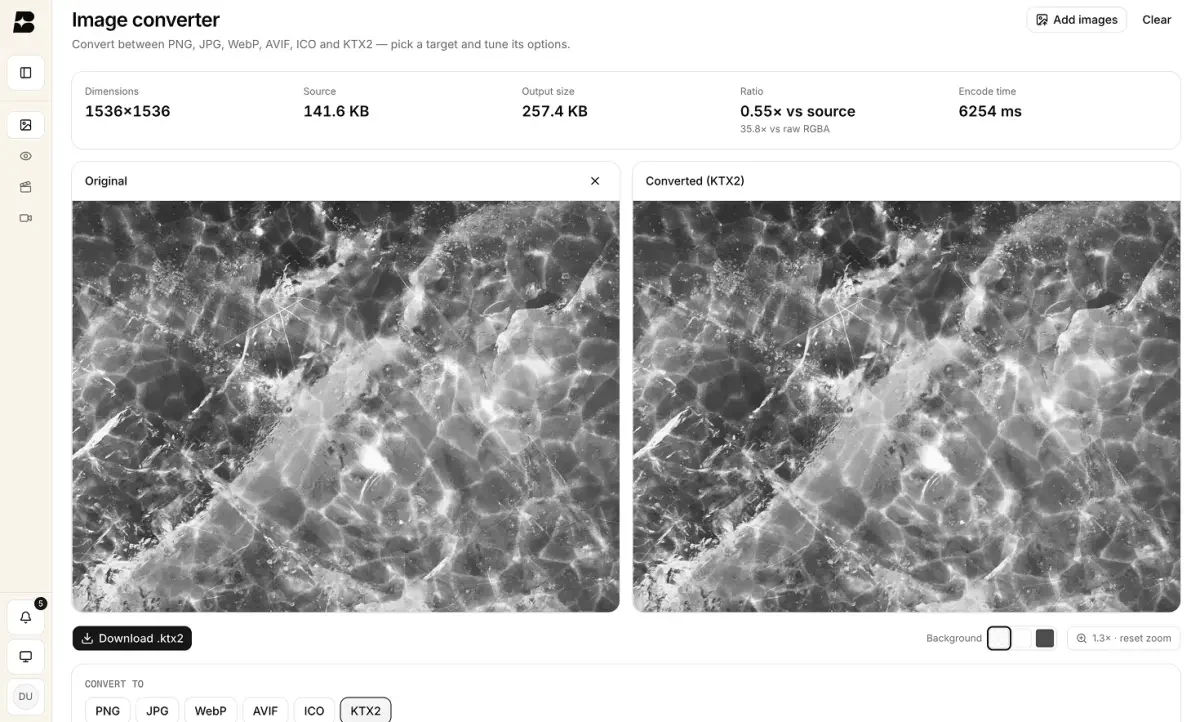
Given the challenges associated with previewing KTX2 files locally, the team developed an internal dashboard that included a converter and previewer. This tool allowed for side-by-side comparisons of compressed and uncompressed textures, allowing for fine-tuning of compression settings tailored for individual assets. This meticulous process led to considerable improvements in the final output, a step often overlooked in WebGL discussions.
Related textures were pooled into shared atlases to further streamline performance. For instance, rather than maintaining separate textures for each hand, they were consolidated into a single atlas with individual UV offsets, drastically reducing the number of files needing loading.
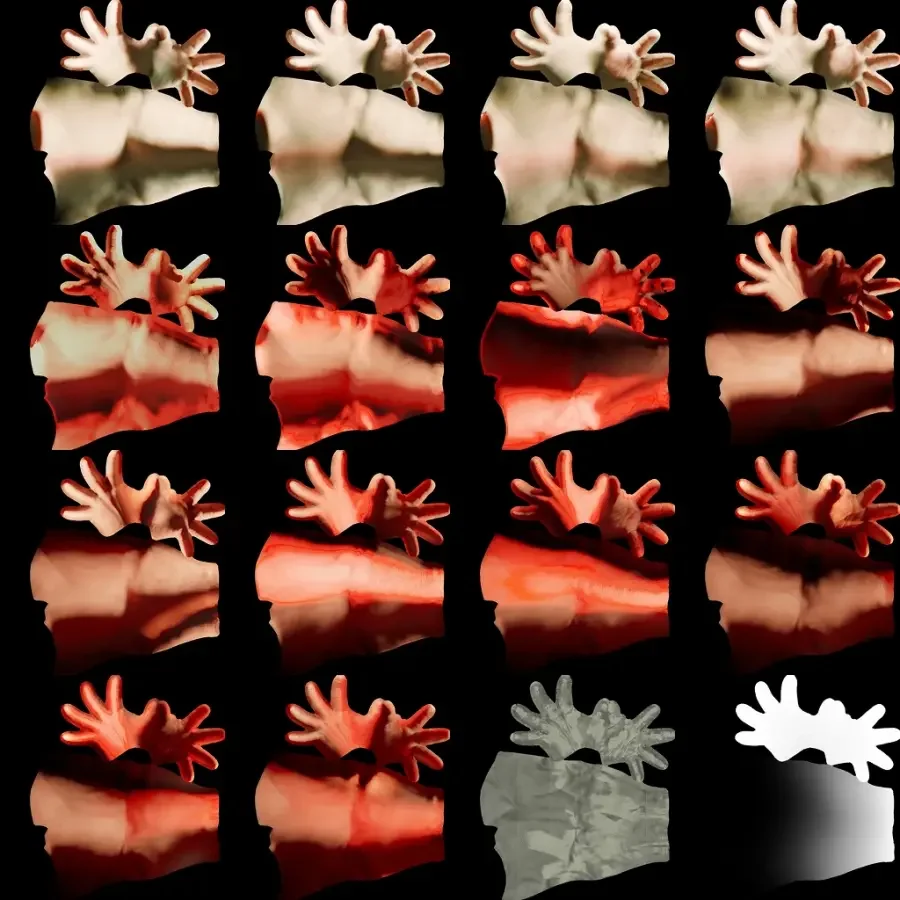
This resolution consolidation continued throughout various assets, resulting in a drop from initial builds of 35 to 40MB down to a final build size of less than 10MB. The interactive map was strategically isolated into its group, ensuring it would never obstruct user access to the main experience.
Mitigating rendering stutters during texture uploads
Reducing file size isn't entirely sufficient; compressed textures must also be uploaded to the GPU efficiently. If this occurs during a scrolling event, it can block rendering, leading to noticeable performance dips. A site might pass benchmarks but still feel sluggish to users.
To circumvent this issue, the team implemented a three-pronged strategy:
- Off-thread decoding: By employing
createImageBitmap(), image decoding occurs off the main thread, allowing GPU uploads to happen during rendering. - Utilizing idle time: Textures were queued for upload and processed during browser idle times whenever possible.
// upload queued textures only while there's idle time to spare
function drainUploads(deadline) {
  while (uploadQueue.length && deadline.timeRemaining() > 5) {
    renderer.initTexture(uploadQueue.shift()); // forces the GPU upload now
  }
  if (uploadQueue.length) requestIdleCallback(drainUploads, { timeout: 2000 });
}- Breaking down large atlases: The largest textures were divided into smaller 256² tiles, allowing uploads to be split over multiple frames, thus keeping rendering smooth.
Anticipating new stages, such as after the loader or during transitions, they synchronously cleared the upload queue to ensure all essential textures were GPU-available before rendering, successfully avoiding first-time upload delays during scrolling.
The adaptive quality manager
Predicting a user’s device capabilities is a challenge, which is why the rendering engine continuously assesses its performance. It maintains a running average of frame times and modifies visual quality accordingly. If performance dips, it scales back; if it improves, it ramps up the quality—without creating jarring fluctuations, thanks to a cooldown period:
if (avgMs > 22 && tier > LOW  && cooldownElapsed) downgrade();   // ~<45fps
else if (avgMs < 12 && tier < HIGH && cooldownElapsed) upgrade(); // ~>83fps
Adjustment affects only visual aesthetics—nothing critical to the story itself. Changes could involve pixel resolution, blur samples, or geometry detail, ensuring consistent narrative delivery on both high-end and low-spec devices. Strategic optimizations also played a role; for example, during the glass shattering interaction, the rendering quality temporarily reduces to mask performance costs inherent to the effect.
Much of the final month was devoted to profiling and optimizing, particularly on budget Android devices. Each frame performance was scrutinized individually to maintain fluidity, revealing that just one delay of 157ms could disrupt the entire experience.
The shaders
The post-processing chain
The final visuals are crafted via a series of post-processing passes, each serving a unique purpose:
- Render: Capture the primary 3D scene.
- Background: Utilize procedural GLSL code instead of static images.
- Glass refraction: Depict unbroken glass with appropriate background refraction.
- Frost and trail: Manifest the user’s gesture, accompanied by frost spread and melting effects.
- Depth of field: Ensure blur quality is tier-adjusted based on performance settings.
- Foreground: Incorporate film grain and final tone mapping.
- Deferred text: Composite text after tone mapping for optimal crispness, disabled when text isn't visible.
- Shatter: Render the breaking glass effect as the finale.
The glass, text, and shatter passes were loaded lazily, keeping them off the critical loading path, which streamlines the user experience.
// boot: the always-on spine, added in order
composer.addPass(renderPass);     // 1. the 3D scene
composer.addPass(bgPass);         // 2. procedural background
composer.addPass(frostingPass);   // 3. draw-zero frost + melt
composer.addPass(lensBlurPass);   // 4. depth-of-field, tier-gated
composer.addPass(fgPass);         // 5. grain + the one tone mapping

// later, off the loader's critical path
composer.addPass(textPass);            // type, composited after tone mapping
composer.insertPass(glassPass, 2);     // slots in right after the background
composer.addPass(shatterPass);         // the break, last over everything

// warmed during an earlier stage's idle time,
// so their first real frame is a cache hit, not a shader-compile stall
glassPass.prewarm(renderer, camera);
shatterPass.prewarm(renderer, camera);

// per frame: don't pay for the text composite when nothing's on screen
textPass.enabled = textPass.hasVisibleSprites();
Each critical moment in the experience is accentuated by a custom shader tailored for specific effects. While initial shader designs benefited from AI assistance, the final versions underwent meticulous refinement to ensure they contributed seamlessly to the overall interaction.
The frost unlock
To create the frost effect, a ping-pong buffer method is employed, executed across four passes: horizontal, vertical, and the two diagonal orientations. This technique expands the drawn gesture by propagating the brightest neighboring pixels, achieving an octagonal spreading pattern while additionally using a frost texture to enhance the appearance. Following the completion of the stroke, the centroid launches into the radial melting effect.
// one of four axis passes → octagonal spread; uSpreadAxis is the pass direction
float m    = texture2D(uPrevTrail, vUv).r;

float step = uSpreadStep * (0.4 + iceLuma * 1.2);      // stepped by frost luma

for (int k = 1; k <= 2; k++) {
  m = max(m, texture2D(uPrevTrail, vUv + uSpreadAxis * step * float(k)).r * 0.92);
  m = max(m, texture2D(uPrevTrail, vUv - uSpreadAxis * step * float(k)).r * 0.92);
}

gl_FragColor.r = m;                                    // frost only ever advance
Innovative lighting solutions for hands
To achieve realistic lighting effects on skinned meshes without incurring excessive computational costs, the team opted to bake lighting into textures, then blend between them. Two texture slots managed this process, where incoming textures for each critical frame are smoothly cross-faded:
// two slots crossfaded; the incoming one holds the next keyframe's texture
vec4 a = texture2D(uTextureA, vUv * uTexScaleA + uTexOffsetA);

vec4 b = texture2D(uTextureB, vUv * uTexScaleB + uTexOffsetB);

a.rgb *= a.a;  b.rgb *= b.a;              // premultiply before the blend

vec4 col = mix(a, b, uProgress);         // uProgress ramps 0→1 across the beat
The team took care to premultiply the alpha values before blending, effectively mitigating any dark halos around the hands' transparent edges. Both lighting textures are stored within a single atlas, allowing for swift transitions via updates to UV offsets and blending factors.