Build a Session-Safe R AI Agent in Shiny with Live Tool Calls
Putting an AI agent in a console is a useful first step. Putting it in front of a trial team raises a harder question: can several people use it at once without sharing a conversation—or sending patient data somewhere it shouldn’t go? This installment turns the R agent into a browser app and starts addressing those production concerns.
It’s part two of a five-part series on production AI agents in R. The example throughout is a clinical trial safety assistant. The series moves from building an agent from a chatbot, to putting it in a Shiny app, then testing whether it can be trusted, handling audit trails, costs and model choices, and finally sharing tools through MCP.
The assistant uses a model, four tools and a loop. The model decides which tool to call; R does the counting. The system also tells the model not to do the arithmetic itself—a rule the next installment will test. If the trial terminology is unfamiliar, the plain-English guide to trial terms explains it.
This section builds the chat interface with {shiny} and {shinychat}, gives every browser session its own conversation, displays the agent’s tool calls, blocks file uploads, and covers slow or unavailable models and deployment to Posit Connect.
Putting {shinychat} between people and the agent
{shinychat} provides chat components for Shiny. The visible conversation comes from chat_ui(); chat_server() connects it to an {ellmer} chat client, sends questions to the model, streams answers back and displays tool calls as they happen.
The client is still the one created by make_agent() in part one. That means its tools, system prompt and agent loop carry over. If you’ve used chat_mod_ui() and chat_mod_server(), {shinychat} 0.5.0 now soft-deprecates those in favour of chat_ui() and chat_server().
The app’s shape
Keeping the page definition in app_ui() lets a test inspect the interface without launching the whole app. The greeting sets expectations: this assistant covers safety data from CDISC pilot study 01, a xanomeline skin patch trial with two doses and a placebo arm. It offers a sample question about common adverse events on the high dose and says it can’t provide medical advice.
GREETING <- paste(
"Ask me about adverse events in CDISC pilot study 01: a xanomeline skin patch at two doses, against placebo.",
"For example: *Which adverse events were most common on the high dose?*",
"I only know this trial's safety data, and I can't give medical advice.",
sep = "\n\n"
)
app_ui <- function() {
bslib::page_fillable(
title = "Trial safety assistant",
shinychat::chat_ui(
"chat",
greeting = GREETING,
placeholder = "Ask about the trial's adverse events",
allow_attachments = FALSE
)
)
}
A greeting is only a user-facing promise. The enforceable medical-advice rule belongs in the system prompt; the next installment adds that rule and tests whether the agent follows it.
The entry point stays brief because Shiny sources the files in R/ before app.R runs. Alongside the files from part one, this app adds ui.R, display.R, wrap.R and attachments.R.
library(shiny)
library(bslib)
library(shinychat)
# shinychat writes a failed answer's error into the chat. Sanitised, it says
# "An error occurred" instead of showing the provider's raw message.
options(shiny.sanitize.errors = TRUE)
# Shiny sources every file in R/ before this runs.
trial_data <- load_trial_data()
ui <- app_ui()
server <- function(input, output, session) {
# One client per session. A client made outside server() would share one
# conversation between every user.
client <- make_agent(tools = with_display(trial_tools(trial_data)))
refuse_attachments(client)
chat <- chat_server("chat", client, history = FALSE)
observeEvent(chat$last_error(), {
error <- chat$last_error()
message <- if (inherits(error, "trial_attachment_refused")) {
conditionMessage(error)
} else {
"The assistant couldn't answer just now. Please try again in a minute."
}
showNotification(message, type = "error", duration = NULL)
})
}
shinyApp(ui, server)
Each call to server() creates a separate agent client, wraps the four trial tools for display, installs an attachment check and connects the client to the chat window. It also watches for errors and gives the user a next step. Provider errors are sanitised: the chat won’t expose the provider’s raw message, and the notification says to try again in a minute. Attachment refusals get their own message.
There’s a privacy detail here that’s easy to miss. The app sets history = FALSE because {shinychat} 0.5.0 otherwise writes conversations to server files, potentially including patient records. Those files sit outside the audit log and retention rules, and the package asks the model to title each conversation. Part four replaces this with a single managed record.
Trial data is loaded once, outside server(), and shared between sessions. That’s appropriate because the app never changes it. To run the project, open this part’s folder as a project, copy .Renviron from part one because Git excludes it, then run renv::restore(). The package cache should make that quick. Or install the new dependencies with install.packages(c("shiny", "shinychat", "rsconnect")), then launch the app with shiny::runApp().
One conversation for each person
An {ellmer} chat client sends the conversation history with every new question. That’s how follow-ups work, and it’s why the client must belong to one user. Shiny runs one R process for many users, but calls server() separately for each browser session. Objects created inside that function are session-specific; objects created at the top of app.R are shared.
Put the client at the top level and every user enters the same conversation. A second person could ask, “what did I just ask?” and receive the first person’s question as context. The mistake can be hard to spot when testing alone.
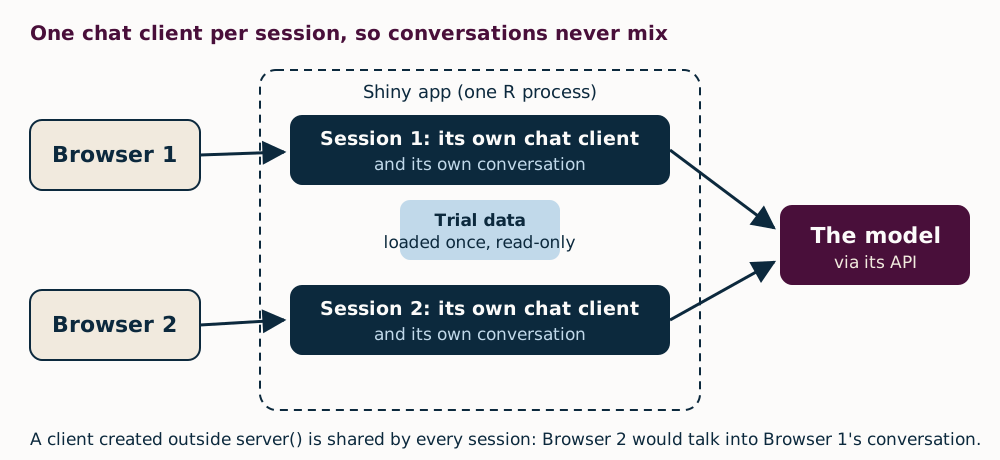
The app tests this boundary with Shiny’s testServer(), which runs the server function without a browser. The test creates one app with shiny::shinyAppDir(), runs two sessions against that same app, and verifies that their chat$client objects differ. Using the same app matters: passing a folder to testServer() would create a fresh app each time and could hide a shared-client bug.
test_that("two sessions never share a client", {
withr::local_envvar(GEMINI_API_KEY = "test-key")
# One app, as on a server: both sessions run inside it. Given a folder,
# testServer() builds a fresh app each time, which would hide a shared client.
app <- shiny::shinyAppDir(test_path("..", ".."))
seen <- new.env()
for (i in 1:2) {
shiny::testServer(app, assign(paste0("client", i), chat$client, envir = seen))
}
expect_false(identical(seen$client1, seen$client2))
})
For browser-level checks alongside testServer(), there’s a series on {shinytest2}.
Let people inspect the agent’s work
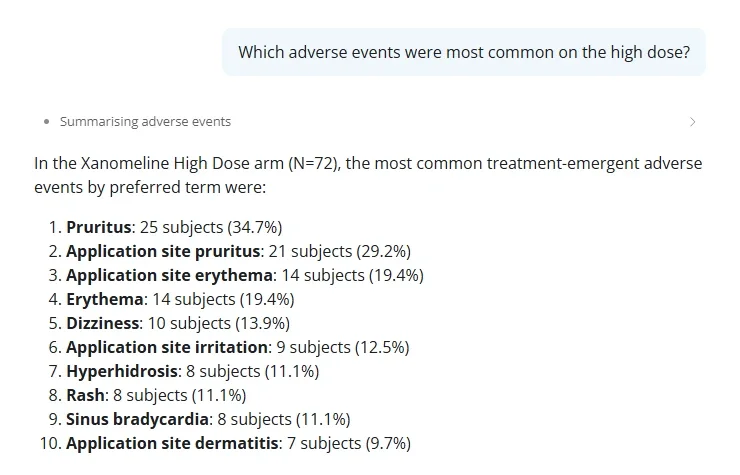
{shinychat} displays tool calls above the answer. Each row uses the title supplied through tool_annotations(title = …) when the tool was defined in part one—for example, “Counting subjects” or “Summarising adverse events.” Expand a row and the trial team can see what the agent requested and what the tool returned. That gives users a way to trace a number to the operation behind it.
Calls to the same tool are grouped into one row by default. Set tool_grouping = "none" in chat_ui() to show each call separately.
The model’s tool results are JSON, which is convenient for software but awkward to scan in a conversation. with_display() adds a readable Markdown display for people while leaving the underlying result available to the model. If building that display fails, the tool result still goes through.
with_display <- function(tools) {
lapply(tools, function(tool) {
wrap_tool(tool, function(run, args) {
value <- run()
# The display is for people. If it can't be built, the model still
# gets its answer.
markdown <- tryCatch(result_markdown(value), error = function(e) NULL)
if (is.null(markdown)) return(value)
ellmer::ContentToolResult(
value = value,
extra = list(display = shinychat::tool_result_display(markdown = markdown))
)
})
})
}
Two helpers support that wrapper. wrap_tool() in R/wrap.R copies a tool and routes each call through a supplied function. Within that function, run() invokes the original tool, while args contains the arguments—including defaults omitted by the model. result_markdown(), in R/display.R, formats JSON as a table or list. Part four uses wrap_tool() again for the audit log.
Not every tool returns JSON. A handover tool introduced in part three returns a plain sentence. The first display implementation failed on that response and brought down the tool call; the current version falls back to plain text.
Keep uploads away from the model
chat_server() allows attachments by default. That means someone could send a CSV, PDF or image straight to the model, bypassing the tested R tools and handing the provider an entire file when the question might need only a few numbers. It cuts across the agent’s central design.
Hiding the upload control with allow_attachments = FALSE in chat_ui() is only a user-interface setting. A request can still arrive without using the page, so the server checks every request too. It rejects user turns containing anything other than typed text and tool results; {ellmer} sends tool results back as user turns.
CSV and TXT uploads need special attention: {shinychat} sends them as plain text inside a <file-attachment> wrapper. The check therefore rejects text with that wrapper as well. Since {ellmer} represents turns and their contents as S7 objects, the code checks classes with S7::S7_inherits() and reads fields with @.
attachment_check <- function() {
allowed <- function(content) {
if (S7::S7_inherits(content, ellmer::ContentText)) {
# shinychat sends a text file (CSV, TXT, JSON and so on) as text in a
# <file-attachment> wrapper, so text can be a file too.
return(!grepl("^\\s*<file-attachment ", content@text))
}
S7::S7_inherits(content, ellmer::ContentToolResult)
}
function(turns) {
for (turn in turns) {
if (S7::S7_inherits(turn, ellmer::UserTurn) && !all(vapply(turn@contents, allowed, logical(1)))) {
rlang::abort(
"Files can't be sent to this assistant. Ask your question as text.",
class = "trial_attachment_refused"
)
}
}
}
}
refuse_attachments <- function(chat) {
chat$on_request_start(attachment_check())
}
This won’t detect someone pasting a file’s contents into a text question; software can’t reliably distinguish pasted data from ordinary text. Access controls and the choice of model provider still matter, and part four covers both.
When the provider stalls
Gemini’s free tier can return “503: high demand” or “429: quota exceeded,” as the first installment describes. {ellmer} retries each request up to three times, with a longer wait between attempts. Set options(ellmer_max_tries = 5) to allow more tries.
If every attempt fails, chat$last_error() fires. {shinychat} puts a generic message in the conversation: “An error occurred. Please try again or contact the app author.” The app also shows its own notification, asking the user to try again in a minute. The same fallback pattern appears in a separate example using dynamic alt text, where tryCatch() handles failure outside a chat app.
Serve two users while the model thinks
R processes work one task at a time. If a question took 20 seconds and blocked the process, every other user’s app would hang for those 20 seconds too.
{shinychat} avoids that wait by streaming responses through {ellmer}’s asynchronous stream_async() inside Shiny’s ExtendedTask. R can keep serving other sessions while the model works. Tool calls still run serially in the shared process, so they need to stay fast; these tools take milliseconds.
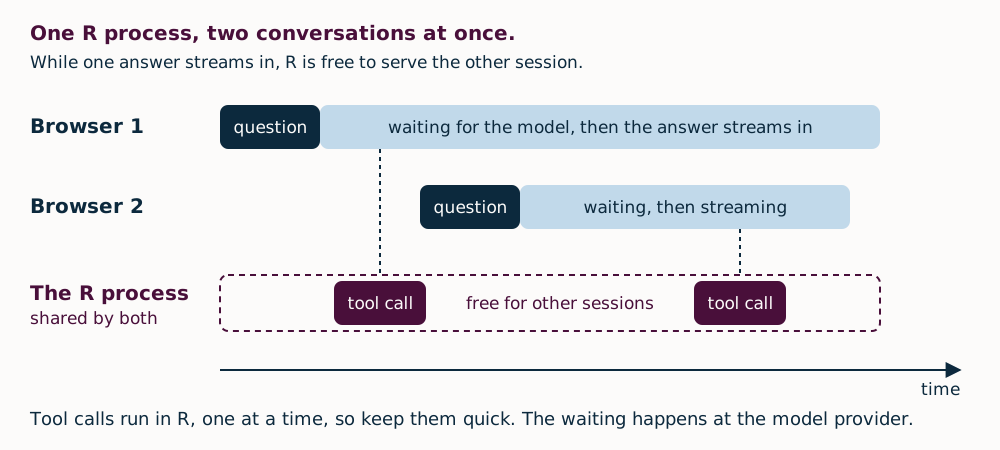
You can see the behavior yourself in two browser windows: ask a question in one, then submit another in the second before the first answer finishes. The second response should begin promptly. A summary of Shiny in Production 2025 discusses asynchronous Shiny in more detail.
A first deployment to Posit Connect
Posit Connect can host the Shiny app for a team and provide sign-in and access control. Treat this deployment as a private test. The free tier is suitable for the public data used here, but not for real patient or confidential data. Apps offered to users in the UK, EEA or Switzerland must use Google’s paid service, a point covered in part four.
This version also gives anyone with app access the ability to see patient records, and it doesn’t keep a log. Parts three and four address those gaps.
After registering a Connect account—the project README has the setup steps—deployment takes one call from the project folder. The appFiles list controls what enters the bundle: app.R, files in R/ and the system prompt. Tests and local files are left out.
rsconnect::deployApp(
".",
appFiles = c("app.R", list.files("R", full.names = TRUE), "prompts/system.md"),
appName = "trial-safety-assistant",
envVars = "GEMINI_API_KEY"
)
The API key stays out of the code and deployment bundle. envVars copies it from the R session—where .Renviron supplies it—to the app’s Vars panel in Connect over an encrypted connection before the first launch. Each later deployment copies the key again, so update both .Renviron and the Connect panel when rotating it.
For anything beyond a private test, use a key tied to your organisation’s account and paid terms, rather than a personal key.
Deployment and session isolation
The meaningful test is whether simultaneous users stay separate. On Posit Connect Server 2026.06.1, two browser windows kept independent conversations. The app bundle contained nine files, but its renv.lock listed 100 packages, so {rsconnect} installed all of them—including test-only dependencies. That slows the first deployment, though it doesn’t affect the app once it’s running.
For deployment on every push, see Keith’s guide to GitHub Actions deployments to Posit Connect Cloud. A Connect server can also publish from a Git-backed repository.
Python version
Shiny for Python can stream chat responses from chatlas, including tool calls. Set content="all" to show those calls in the chat, as the R app does. Shiny Express runs the file once per session, giving each user a separate client:
from pathlib import Path
from chatlas import ChatGoogle
from shiny.express import ui
# Shiny Express runs this whole file once per session,
# so each user gets their own client.
client = ChatGoogle(
model="gemini-3.7-flash",
system_prompt=Path("prompts/system.md").read_text(encoding="utf-8"),
)
# client.register_tool(...) for each tool, as in part 1
chat = ui.Chat(id="chat")
chat.ui()
@chat.on_user_submit
async def _(user_input: str):
response = await client.stream_async(user_input, content="all")
await chat.append_message_stream(response)
What’s ready—and what comes next
This agent is now a multi-user Shiny app: conversations stay private to each session, tool calls appear in the chat, file attachments are rejected, and failed questions tell users what to try next. It runs on Posit Connect. Before sharing it, work through Tim’s five pre-flight checks for your dashboard; the same checks apply to chat apps.
That’s a solid deployment milestone, but it doesn’t establish whether the answers deserve trust. The next step is to test the tools, evaluate the agent, and trace every number in an answer to its origin. Reviewers will also be the only people allowed to open a patient record, and they’ll have to confirm each record.
The app and its tests are available in the code repository. If you’re building AI tools with Shiny, the call for talks for AI in Production 2027 is open until 29 January 2027. The LLM-Driven Applications with R and Python course also covers adding chat to a Shiny app.